


No. Account deletion is permanent and cannot be undone. Once your account is deleted, all your data will be permanently removed.
Permanent Action
Delete Your Account
We respect your choice and your privacy. If you no longer wish to use Vynk, you can request the permanent deletion of your account and associated personal data. Once your request is processed, your account will no longer be accessible.
How to Delete Your Vynk Account
You can permanently delete your Vynk account directly from the app by following these steps.
01

Open Vynk
Open the Vynk app and sign in to your account.
02
Open Settings
Go to your Profile and open Settings.
03
Select Delete Account
Select Delete Account from your account settings.
04
Confirm Your Request
Review the information shown and confirm your deletion request.
05
Complete Verification
Follow the final verification step to permanently delete your account.
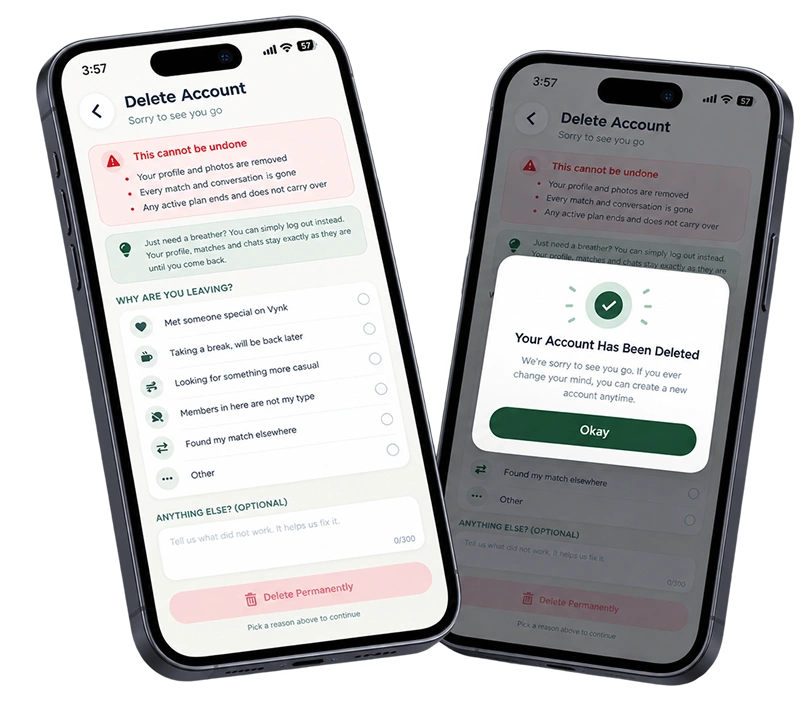
What happens when you delete your account?
Deleting your account will permanently remove:
Profile information
Photos and media uploads
Matches and connections
Messages and conversations
Profile preferences and settings
Activity history tied to your account
Some information may be retained for a limited period where required for fraud prevention, security, dispute resolution, or legal compliance.
How it works
Frequently Asked Questions

Need Help?
Can't access your account? If you've lost access to your phone, email, or device, our support team can help verify your identity and process your request.
Contact SupportWhen contacting support, please include:
Your registered email address
Your registered phone number (if applicable)
Brief description of your issue